Mammotion Remote Controller
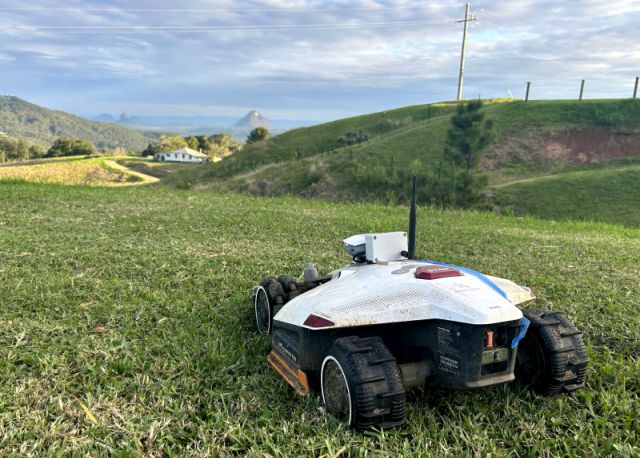
Mammotion Remote Controller
Drive your robot mower over the internet + a low-cost alternative to the 4G module

What you get
- Remote control over the internet — drive the mower and watch its camera from your phone or PC.
- Optional long-range coverage, 1–2 km — add a Wi-Fi HaLow access point to reach far beyond your home router.
- A 4G alternative — no cellular module, no SIM, no subscription.
- No soldering or electronics expertise — everything plugs together and flashes from your browser.
This DIY project turns your Mammotion mower into what it should always have been — remotely controllable, with a live camera and Wi-Fi coverage stretched across your whole property — starting at around $60 AUD, with no monthly fees.
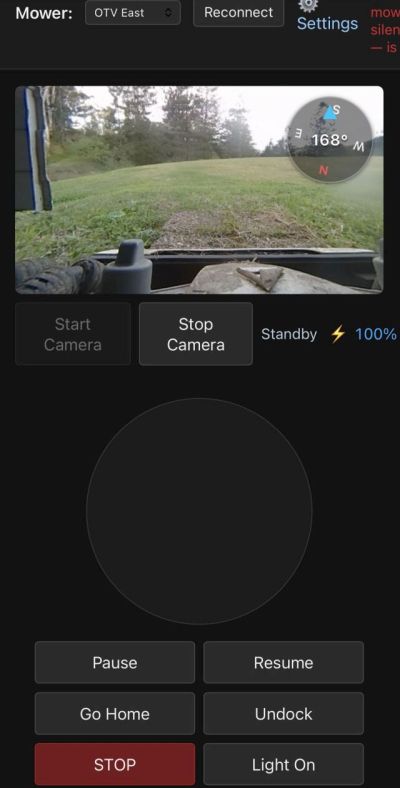
From the web UI you can:
- Drive the mower with an on-screen joystick.
- Pause and resume its mowing job, or send it back to its dock.
- Turn the camera and the mower’s light on or off.
- See its battery, status and any fault at a glance.
- Read a live compass showing which way it’s facing.
- Planned: a Google Maps view of the mower’s exact position, as an alternative to the camera.
How it works
4G is only necessary because of the limited range of 2.4GHz WiFi.
Wi-Fi HaLow (IEEE 802.11ah) is a newer Wi-Fi standard built to give IoT devices a low-bandwidth but long-range link. The theoretical maximum is 32 Mbps, but in practice you can expect 10–12 Mbps and a range of up to around 2 km — plenty for control and video, and far more reach than ordinary 2.4 GHz Wi-Fi.
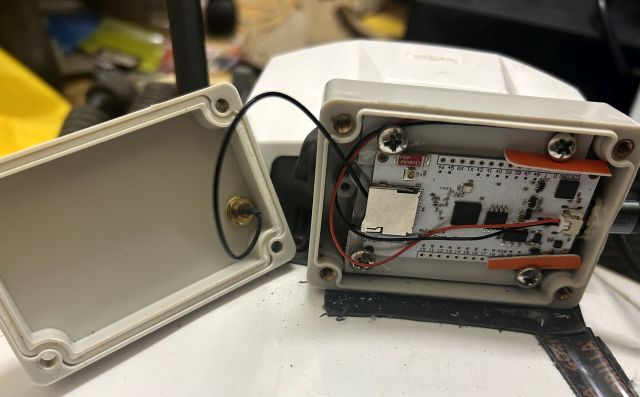
You assemble the components neatly into the project box, fix it to your mower, and plug the USB-C cable into the port on the back of the mower. The Heltec HC33 on the mower bridges the mower’s Bluetooth onto your network, so software can talk to it over Wi-Fi instead of standing right next to it. It can connect one of two ways:
- Over your existing Wi-Fi — the HC33 simply joins your home 2.4 GHz network. Nothing else required, and it works anywhere your Wi-Fi already reaches.
- Over Wi-Fi HaLow, for long range — add a Heltec HD01 access point at the house and the HC33 links to it over 802.11ah, extending usable range to 1–2 km and giving the mower its own hotspot along the way.
A small Python server on any PC on your network serves a web page that — using the open-source PyMammotion library — lets you start the camera and drive the mower from a browser. For the long-range option, a Heltec HD01 HaLow access point sits on your network as the far-reaching link the HC33 connects to.
Long range (~$180 AUD): add the HD01 HaLow access point to push coverage out to 1–2 km across a large property or acreage. Same web control and camera — HaLow just adds reach.
Components
| Part | What it’s for | Approx. |
|---|---|---|
| Heltec HC33 | The on-mower brain — HaLow radio + Bluetooth + Wi-Fi | $45 |
| Heltec HD01 Wi-Fi HaLow AP (optional) | Long-range access point at the house — skip it to run over your existing Wi-Fi | $120 |
| 915 MHz antenna + U.FL→SMA cable (optional) | HaLow antenna for the HC33 — only needed for the long-range HaLow setup | $5 |
| 90° elbow USB-C to USB-C cable | Neat power connection to the mower | $4 |
| Project box | Weather-resistant enclosure (I used a 83×58×35mm one) | $4.50 |
| Total — over existing Wi-Fi / with HaLow long range | ~$60 / $180 | |
You’ll also need a PC, or any other Python-capable device, on the same network.
Getting started
- Assemble the hardware. Fit the HC33, antenna and USB-C cable into the box, mount it on the mower, and plug into the mower’s USB-C port.
- Flash the HC33. The easiest way is the browser-based flasher — no toolchain, just plug the HC33 into a PC over USB and flash from a Chromium browser. You set your HaLow network name and region during flashing.
- Set up the HD01 access point at the house and connect it to your home network.
- Install the server. On a PC on your LAN (Python 3.13 or 3.14), run the one-command installer. It creates everything it needs and gives you a web address.
- Open the web page, sign in with your Mammotion account so it can find your mower and camera, and drive.
Full step-by-step instructions, firmware binaries, and the browser flasher are all on GitHub — see the link below.
Good to know
Why I built this
On The View Park uses a fleet of 3 x Luba 2 5000X and 1 x Luba 2 10000. Now that the park is open, we have to mow mainly at night.
Being a park that is open to the public means that nothing stays static: rocks move, visitors leave stuff behind, fences and bollards are constantly relocated.
All of this means stuck mowers – often after hours and on weekends
Eventually I got sick and tired of driving 30 minutes each way just to push a mower 10 cm back into its area or around an obstacle.
Being an ethical hacker, my first instinct was to just hack the thing to accept remote-control commands over 4G. The problem with that approach is that Mammotion would just patch it and the world would move on. So instead, I wanted to build something they can’t patch away — something that would force every mower manufacturer to include this ability by default.
Using the same Bluetooth link that the app uses and getting power from the mower’s USB-C port makes this solution both user-friendly and virtually un-patchable. Hopefully Mammotion gets the message. 🙂
A big thank you
None of this would exist without Michael (@mikey0000), the author of PyMammotion. His library does all the hard work of speaking the mower’s protocol — everything here is simply built on top of it. Thank you, Michael. If this project is useful to you, please go and star PyMammotion too. 🙏
Another big thank you goes to Claude Code. I had to constantly push him as he isn’t as persistent as I am, but he did write 99% of the code, and it would have taken me x10 the time without him.
This is an independent, community DIY project. It is not affiliated with, endorsed by, or supported by Mammotion or Heltec. “Mammotion” and “Luba” are trademarks of their respective owners. Modifying your mower and running long-range radio equipment is at your own risk and responsibility, including compliance with local radio regulations.
Recent Comments